cmux
A native-Mac terminal built on Ghostty for running many agents at once, with the AgentLayer sidebar showing who is waiting and what each agent is working on.
In short
cmux is a Mac terminal for running many agents at once, and the AgentLayer sidebar keeps every session and your agent's projects, reports and goals beside them. Install cmux first, then switch the sidebar on.
cmux renders through libghostty and reads your existing Ghostty config, so the look and keybindings carry straight over. It is built for the parallel-agent era: instead of one terminal with one session, you get workspaces in a vertical sidebar, each showing its git branch, PR status, working directory, and the latest agent notification.
Why it fits
- One workspace per agent task. Your agent in one, a coding agent in another, a long research run in a third. Split panes within a workspace for editor, logs, and agent.
- Notifications that tell you who is waiting. When an agent finishes or needs input, its pane rings and the sidebar tab lights up. You know which of your six running agents wants attention without staring.
- Organize like a file system. Group workspaces into folders, colour-code by project, and the sidebar becomes a live map of everything in flight.
- Session restore. Layouts, directories, and scrollback survive closing the lid.
The AgentLayer sidebar
The AgentLayer sidebar is one panel in cmux's right sidebar, shared by every AgentLayer agent on your Mac. It shows every agent session that is running, and the projects, reports and goals of the agent you are working with, so the day's view stays beside your terminals.
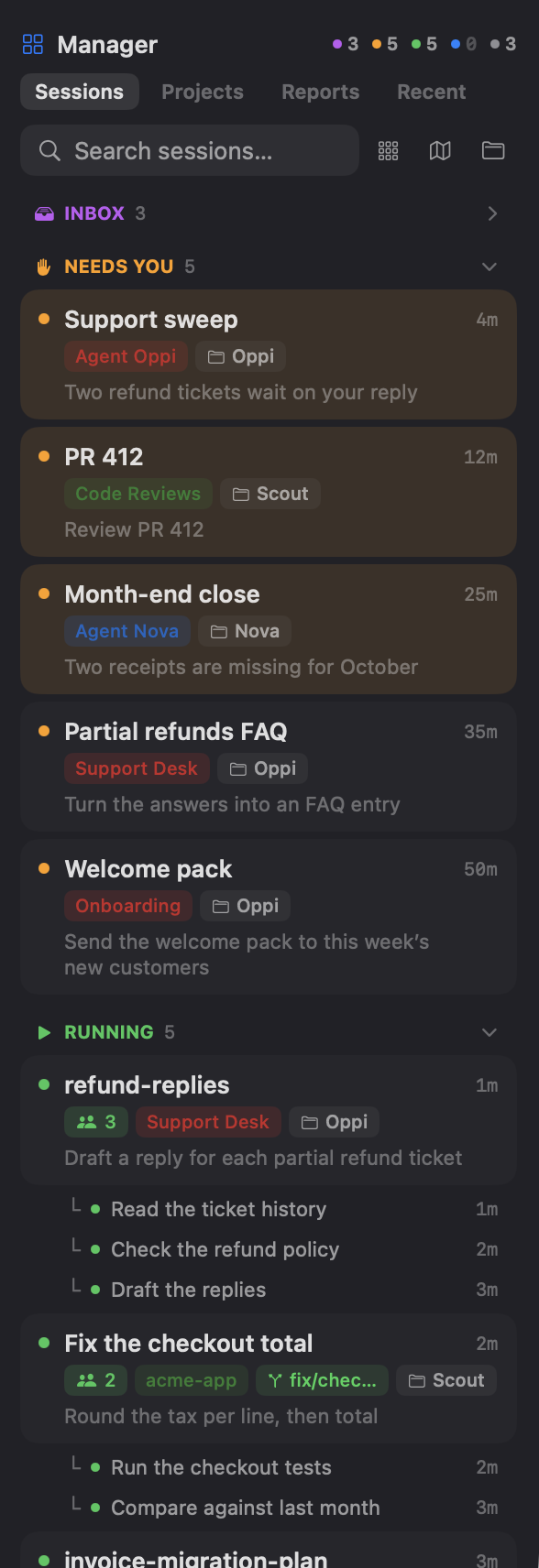
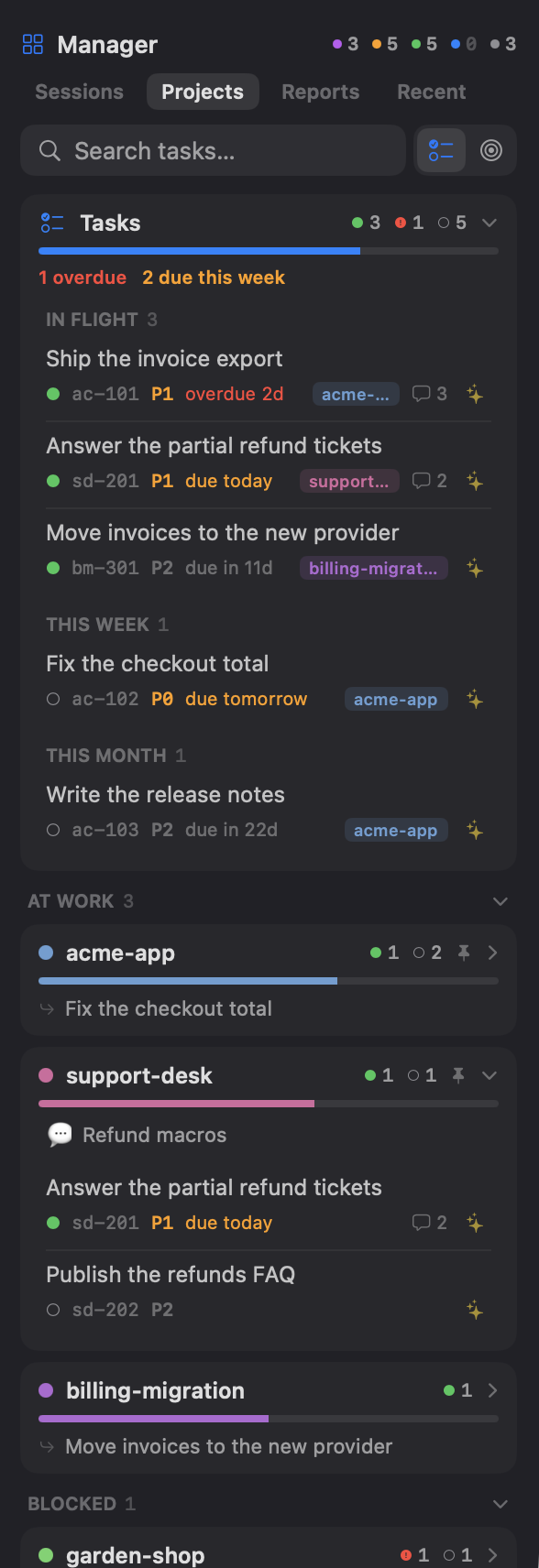
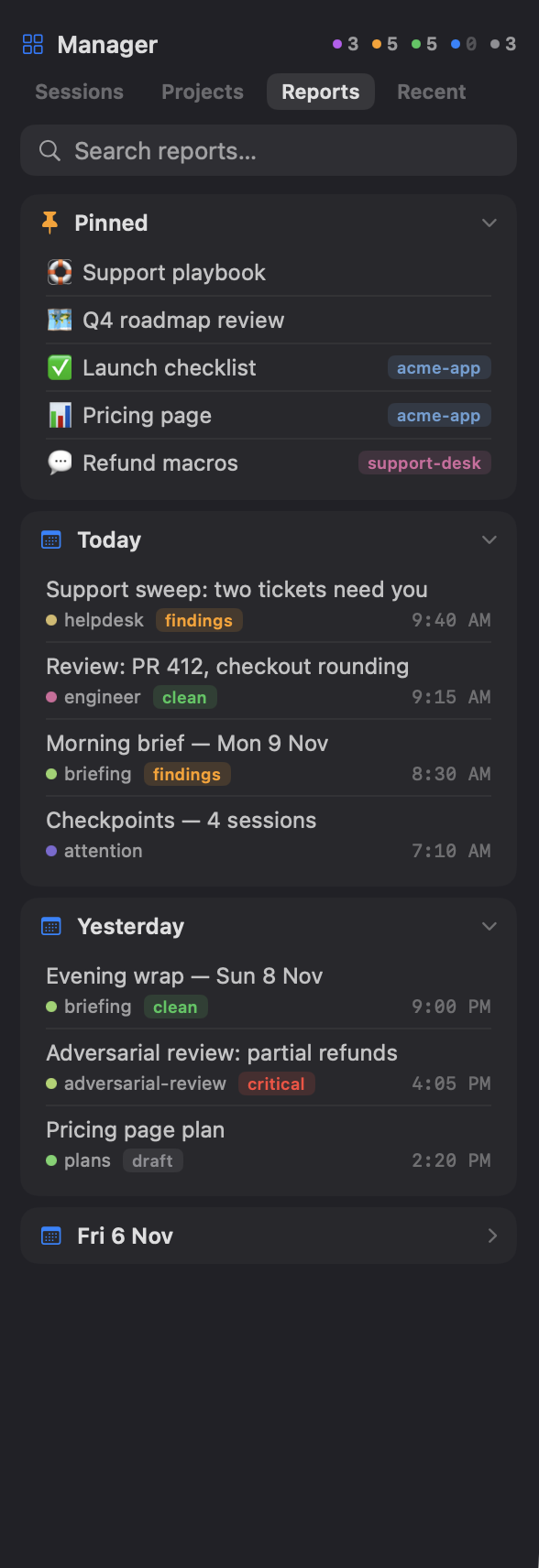
It has two icon tabs: Manager for sessions, Agents for what one agent knows. The screenshots show a demo with three agents, Oppi, Nova and Scout, working for Acme.


Manager
The Manager is the open-source cmux Manager, bundled in. It lists every Claude Code and Codex session running in cmux, one card each, in five groups:
| Group | Holds |
|---|---|
| Needs you | Waiting on your input, or finished a turn you haven't looked at |
| Running | Working, or one of its subagents is |
| Recent | Idle for under an hour |
| Idle | Idle for over an hour |
| Ended | Ended in the last 24 hours, folded |
A card shows how long the session has been in its state, its workspace, branch and folder, and your last prompt, with its subagents listed under it. Click a card to jump to its tab. Search covers the title, prompt, workspace, group, folder and branch.
Sessions show up once cmux's hooks are set up. Run cmux hooks setup once if they don't.
PROPOSED
Above Needs you, PROPOSED holds every agent's proposals: sessions the agent has lined up for you. The section starts folded and no card opens on its own. A closed card shows what the session will do, the agent's badge, its estimate, any due date, and why it's there; open it for what it will do and what it may touch, with Start, Later and Skip. A button types the choice into that agent's heartbeat tab, and Start opens the session where its work belongs (Opening a session). A proposal put off with Later stays hidden until its time.
An agent without a running heartbeat gets a Start heartbeat card instead of buttons, which opens a session in its home that runs /heartbeat.
Agents
The header holds one chip per agent home, its emoji and name, lit in the agent's own color when it's the one showing. Chips sit in the order agents joined; cmux sidebar order changes it. The tab has three sub-tabs, plus a Dashboard icon that opens the dashboard at the matching page in a cmux browser tab, and a Roadmap icon when the home has a roadmap.html.
- Projects. The board's one-line summary with its age, then a search over the agent's tasks. A Tasks card with the active, blocked and open counts, a progress bar, the overdue count in red and the count due this week (the next seven days) in orange. Tap it for the agenda: In flight, Overdue, Today, This week, This month and Later. Below it, projects are grouped At work, Blocked and Quiet, and each group folds. A project card shows its colour, counts, progress and next task, and opens to its roadmap link, README pins and tasks.
- Reports. A search, then Pinned: the home's pins from
reports/pinned.md, then each project's pins. Then Today, Yesterday and older days, with older days folded; a report sits under the day it was last updated. Each row has a title, a kind badge, a status (clean, findings, critical or draft) and a time. It holds the newest 40 reports and links to the dashboard for the rest. - Goals. The year's theme, then Today, This week and This month open, and This year folded. Each goal shows its number, project, headline and what counts as done. An empty horizon says so and names the request that sets it, such as "goals day". A week's goals set for an earlier week are captioned with that week. See Goals.
Tapping a task, a report or a pin opens it as a cmux tab: .html files in cmux's browser, anything else through cmux.
Discuss
Every task row and goal carries a Discuss icon (✦ sparkles). It opens a session on the discuss skill for that task or goal: a short brief (where it stands, what's unknown, two or three ways forward with the one the agent would pick), a conversation, then a choice of next move, such as plan it, break it into steps, start now, or park it. Nothing changes until you pick, and the decision is noted in the task's thread.
Opening a session
Discuss, a proposal's Start and Start heartbeat open their session as a focused tab in the agent's own workspace that fits the work, and select that workspace. The sidebar picks it in two steps:
- Which workspaces are the agent's. The one titled
Agent <Name>(or, without one, a workspace opened in the agent's home), every workspace in its cmux group, and any workspace opened in its home or its code repos. Another agent's workspaces never qualify, even the selected one, and neither do remote ones, which can't take a new tab. - Which one fits the work. For a proposal, the workspace the heartbeat named for it; then the work's folder; then a project's name; then the kind of work in the title, so a review lands in
Code Reviewsand an investigation inInvestigate Issues.
With no fit it opens in the agent's own workspace, then the selected one if it isn't another agent's, then a new workspace in the agent's home. The sidebar never writes to the home itself: its buttons open a session or type a command into one, and the session does the work.
Which agent it shows
The selected cmux workspace picks the agent. A workspace opened in an agent's home shows that agent. Tap another chip to look at a different agent while you stay in that workspace.
Switch it on
The sidebar is the optional cmux pack. Setup offers it on macOS when cmux is installed, ticked already when setup runs inside cmux. Any time after, run the configure-skills skill and choose the cmux pack. It needs no keys, no tools and no permissions. Before it installs, it compares your Ghostty and cmux settings with the recommended ones (cmux settings, read-only) and shows what is missing, with the text to paste; your own values are kept.
To add it by hand, run this in a terminal inside cmux:
bun "<plugin root>/src/cli.ts" cmux sidebar install --home="<your agent's folder>"Each other agent home on the Mac joins with the same command and its own --home. Install checks the cmux version, has cmux check the new file before it replaces the installed one, writes ~/.config/cmux/sidebars/agentlayer.js, and shows it in the right sidebar. To show it again later:
cmux right-sidebar set custom agentlayerSidebar commands
| Command | Does |
|---|---|
cmux sidebar install | Adds this home to the sidebar, starting the file if it's the first, and shows it. Run it inside cmux |
cmux sidebar refresh | Puts this home's latest projects, tasks, reports and goals into the sidebar |
cmux sidebar remove | Takes this home out. Removing the last home deletes the sidebar file |
cmux sidebar order <agent>… | Puts these agents' chips first, in this order. The rest keep their order after them |
cmux settings --file=<ghostty|cmux> | Compares your Ghostty or cmux settings with the recommended ones and prints what to paste. Read-only |
Run each one the same way as install, with bun "<plugin root>/src/cli.ts" in front and --home after.
order names an agent by its name, in any case, or by its home folder when two agents share a name. The order is one list for the Mac, so any home can set it and every home's refresh keeps it. A new agent joins at the end. For example:
bun "<plugin root>/src/cli.ts" cmux sidebar order Oppi Nova ScoutHow it stays current
You rarely need refresh. Every dashboard rebuild also rewrites this home's entry in the sidebar when something changed, and every task change triggers a rebuild. cmux redraws within a second.
To refresh it on demand, ask your agent to "refresh my sidebar". It updates this home's entry and nothing else, and says whether it wrote the sidebar, found it already up to date, or found the sidebar not installed or this home not in it yet.
After a plugin update, a home whose entry an older version wrote shows "needs its agent updated to show here" until that home runs upgrade, or its dashboard is refreshed.
Requirements and limits
It needs macOS, Bun, and a recent cmux in /Applications. Install checks the cmux version and names the one it needs when yours is too old. cmux's own right-sidebar modes, Files and Vault, sit beside it.
The cmux Manager on its own
Without AgentLayer, the cmux Manager is the Manager tab by itself: the same session cards and groups. It is one file. Download it into cmux's sidebar folder and open it on the right:
mkdir -p ~/.config/cmux/sidebars && curl -fsSL https://raw.githubusercontent.com/AgentLayer1/cmux-custom-manager/main/dist/manager.js -o ~/.config/cmux/sidebars/manager.js
cmux right-sidebar set custom manager
Run the same curl again to update it. It needs macOS and a recent cmux (the repo names the oldest version it supports), and sessions appear once cmux hooks setup has run. The repo has its limits and how it is built and tested. MIT licensed.
Toolbar buttons
The tab bar above each pane can hold your own buttons. This setup puts the agents, the layout moves and the sidebar one click away:
| Button | Does |
|---|---|
| Claude Code | Opens a new tab running claude |
| OpenAI Codex | Opens a new tab running codex |
| New terminal, split right, split down | cmux's own buttons, kept in the row |
| Manager | Opens the AgentLayer sidebar on the right |
Each custom button is an action in ~/.config/cmux/cmux.json, and ui.surfaceTabBar.buttons sets which buttons show and in what order. Back the file up before editing it:
{
  "actions": {
    "claude": {
      "type": "command",
      "title": "Claude Code",
      "subtitle": "Open Claude Code in a new terminal tab",
      "icon": { "type": "symbol", "name": "staroflife.fill" },
      "command": "claude",
      "target": "newTabInCurrentPane"
    },
    "codex": {
      "type": "command",
      "title": "OpenAI Codex",
      "subtitle": "Open OpenAI Codex in a new terminal tab",
      "icon": { "type": "symbol", "name": "chevron.left.forwardslash.chevron.right" },
      "command": "codex",
      "target": "newTabInCurrentPane"
    },
    "manager": {
      "type": "command",
      "title": "Manager",
      "icon": { "type": "symbol", "name": "square.grid.2x2" },
      "command": "cmux right-sidebar set custom agentlayer && exit",
      "target": "newTabInCurrentPane"
    }
  },
  "ui": {
    "surfaceTabBar": {
      "buttons": ["claude", "codex", "cmux.newTerminal", "cmux.splitRight", "cmux.splitDown", "manager"]
    }
  }
}- Icons are SF Symbols names.
agentin place ofclaude: if you set up Billing per agent, change the Claude Code button's command toagent, so the button starts the agent on its own subscription.agentis the shell command that page adds; without it, keepclaude.- Manager runs its command in a throwaway tab:
exitcloses the tab once the panel is open. With the Manager on its own, useset custom managerinstead. buttonslists every button the bar shows, so keep thecmux.*ones you want.
Apply it without restarting:
cmux reload-configPairing with worktrees and your agent
One workspace per worktree, one agent per workspace. See Worktrees.
The session radar (attention checkpoint all) reads cmux's structured state where it is available, so it can say which workspace a session lives in rather than guessing from rendered text.
Launch from the home
A multiplexer that opens workspaces at repo paths will start sessions outside the agent home, and those sessions are not captured. Open the agent's workspace at its home, such as ~/Documents/Agents/Oppi, and reach repos through additionalDirectories. Opening it there is also how the sidebar knows which agent to show. See The one convention.
cmux is open source (AGPL-3.0, by Manaflow AI).